General Notification Service
The General Notification Service (GNS) stores and processes notification messages. Notifications are triggered by the setting and clearing of alarm bits, and are enabled on a per alarm basis in the Point Service (PNT). When a Current Value Service (CVS) retrieves a value for a tag, it checks the tag record for alarm and notification settings. If the Report to GNS option is enabled in the alarm settings, the CVS sends the tag’s real-time record to the GNS for processing along with the GNS identifier, and then the GNS builds and processes the notification. The notification message and its recipients are configured and stored in the GNS. Several types of notification messages are supported including email, SMS (text) messages, voice messages (via a SIP server or Dialogic board), messages sent to third-party notification services, and others.
|
Click the thumbnail to see |
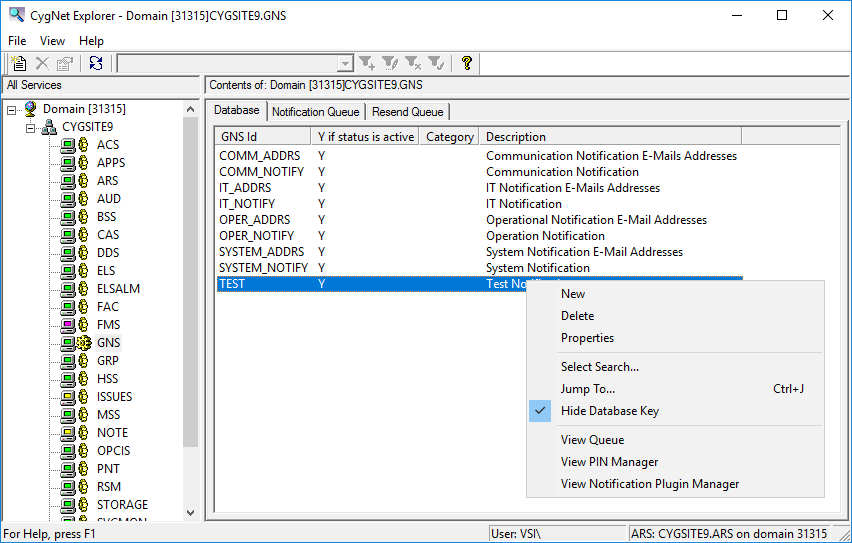
Context Menu Options
The following table lists and describes the context menu options that display when you right-click in the Note service pane.
| Option | Description | Shortcut |
|---|---|---|
|
New |
Click this option to create a new notification. |
|
|
Delete |
Highlight an existing notification and click this option to permanently delete a notification record. |
|
|
Ack |
Click to acknowledge a selected notification. |
|
|
Properties |
Highlight an existing record and click this option to view its properties in read mode. You can also just double-click an existing record. |
|
|
Select All |
Select all notifications in the queue. |
|
|
Select Search |
||
|
Jump To |
Ctrl+J |
|
|
Hide Database Key |
Click to Hide/Display the column in the service pane containing Data key values for each record. |
|
|
View Queue |
Select to go to the Notification page. See Managing the GNS Queue. |
|
|
View PIN Manager |
Click to open the GNS PIN Manager, which is used to manage the users who are permitted to send acknowledgment emails (and SMSs). |
|
|
View Notification Plugin Manager |
Click to open the GNS Notification Plugin Manager, which is used to configure custom notification plugins. |
More:
 GNS Configuration File Keywords

